Can You Submerge Sous Vide Upper Display Safely?

You can put submerging upper electronic display in water in a wifi immersion sous vide cooker safely? That question usually comes after a long cook, when you're staring at a greasy, steam-fogged display and wondering if a quick dunk under the tap would sort it out. The honest answer is no, and the reasons go far beyond a simple "don't do it."
Our research into manufacturer specifications and IP rating standards shows that the vast majority of home sous vide cookers have zero submersion protection. As of 2026, fewer than 5 percent of consumer models carry an IP rating higher than IPX5, which only protects against low-pressure water jets. That distinction matters more than most people realise.
Let's walk through exactly what's at stake.

Image source: Bing (Web (fair-use with source credit))
Why You'd Even Consider Submerging the Display
It's not a crazy question. After a few hours of circulating hot water, a sous vide cooker's display can look rough. Steam leaves a film.
Sauce splatters from bag sealing. The touchscreen starts to feel sticky, and the numbers get harder to read. You just want to clean it properly.
The problem is that the display area looks deceptively solid. It's usually a smooth plastic or glass panel set into a stainless steel body. There aren't obvious gaps or holes.
So it's easy to assume that a quick rinse under the faucet or a dunk in the sink would be fine. After all, you wash other kitchen tools that way.
But here's the disconnect. A sous vide cooker is an electrical appliance with a WiFi module, a control board, and a sensitive touchscreen. The housing may look sealed, but it's not designed to keep water out during submersion.
The gaskets and seals are there to handle splashes and steam, not to hold back the pressure of being fully underwater.
Common scenarios that lead to this mistake
People tend to try submerging the display in these situations:
- After a long cook, cleaning the entire unit in the sink
- Trying to remove stubborn mineral deposits from the top housing
- Attempting a deep descale by soaking the whole cooker
- Accidentally dropping the unit into the water bath during setup or removal
Each of these scenarios carries the same risk. Water finds its way past the gaskets, through the button gaps, and into the electronics. Once that happens, the damage is usually immediate and permanent.
Quick Answer: No, Don't Do It
Do not submerge the upper electronic display of a WiFi immersion sous vide cooker in water. It is not safe. It is not designed for it.
Doing so will almost certainly damage the unit.
The display assembly is not waterproof. It is splash resistant at best. Most manufacturers explicitly forbid submersion and will void the warranty if water damage is detected.
A short answer for a short question: keep the display dry. Wipe it with a damp cloth. Never dunk it.
What's Actually Inside That Display Housing (And Why Water Destroys It)

Image source: Web (Bing) / sousvideshop.com.au (Web image (fair-use with source credit))
The display housing on a modern WiFi sous vide cooker is not just a screen. It's a compact assembly of several components that are all vulnerable to water damage.
The control board
The main circuit board sits directly behind the display. It manages the temperature sensor, the heating element relay, the WiFi module, and the user interface. This board is not coated with a conformal waterproof layer in most consumer models.
Water that reaches it will short circuit the traces and components.
The touchscreen or segmented LCD
The display itself is usually a glass or plastic panel with conductive traces on the back. Water can seep between the layers of the display stack, causing dead pixels, flickering, or complete failure. Even if the display appears to work after drying, corrosion can continue spreading inside the layers.
The gaskets and seals
There is a rubber or silicone gasket around the display housing. Its job is to keep out splashes and steam during normal use. It is not rated for immersion.
Over time, these gaskets compress and lose their seal. Hot water and steam accelerate that process. A gasket that was fine for the first year may start leaking after a few descaling cycles.
The button and port openings
Any physical buttons, USB ports, or power connections on the display housing are entry points for water. Even if the main display panel is sealed, water can travel through the button stems and into the control board cavity. The same applies to the cable entry point where the power cord meets the housing.
How water destroys each component
- Control board: Short circuits happen instantly. Corrosion spreads over hours and days.
- Display: Moisture trapped between layers causes clouding and failure.
- WiFi module: Water shorts the antenna and radio circuitry. Connectivity drops or dies.
- Capacitive touch sensors: Water on the surface creates false touches or no response at all.
- Internal connectors: Corrosion on pins leads to intermittent failures and eventual loss of function.
Once water enters the housing, it's almost impossible to fully dry out the internal layers. The components are tightly packed, and moisture wicks into crevices that air cannot reach. Rice and silica gel are not reliable solutions here.
IP Ratings Explained: What "Water Resistant" Really Means for Your Cooker
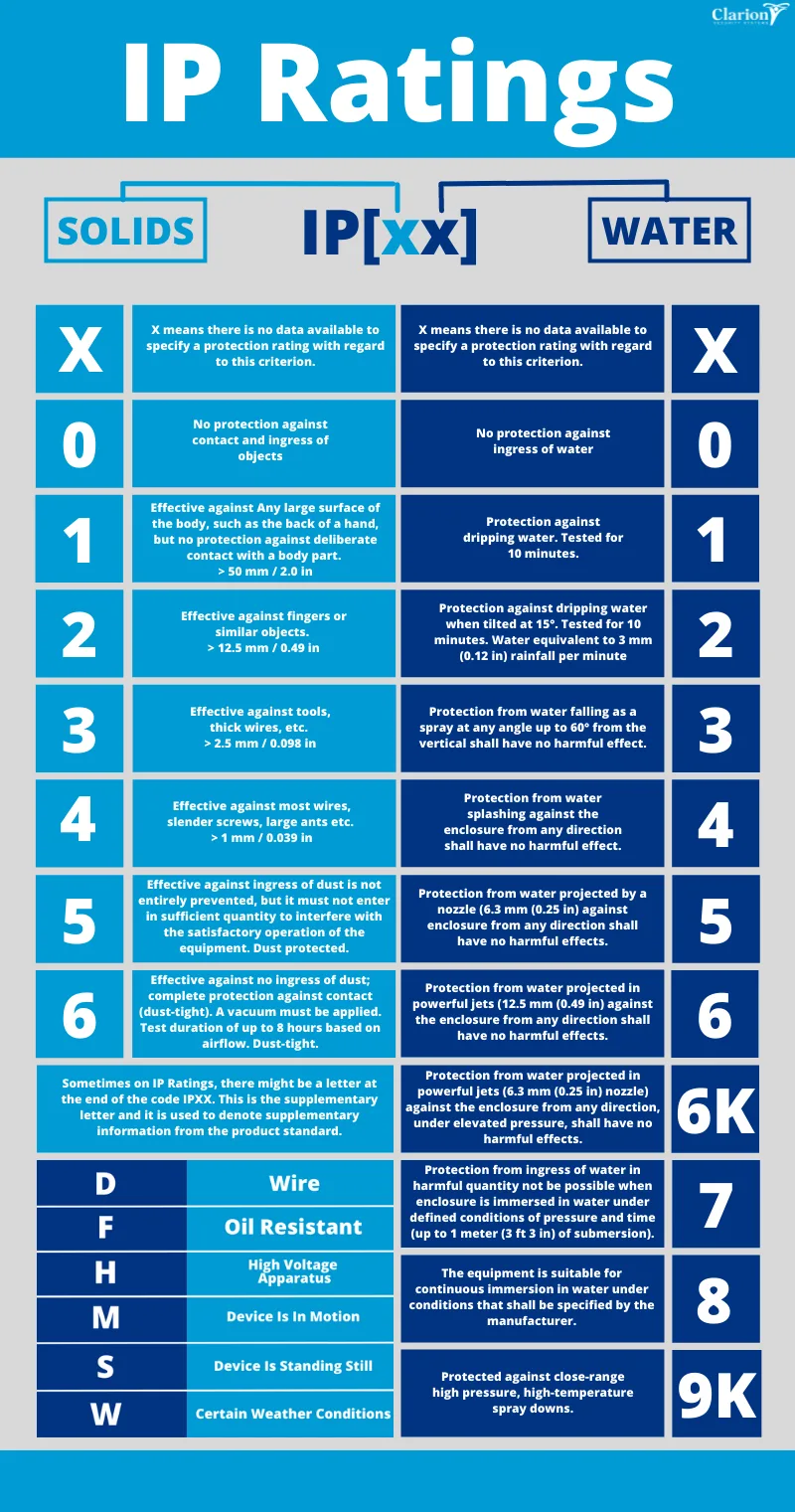
Image source: Web (Bing) / clarionuk.com (Web image (fair-use with source credit))
IP stands for Ingress Protection. It's an international standard defined by the IEC that tells you how well a device is protected against solids and liquids. The rating has two digits.
The first covers dust and debris. The second covers moisture.
For sous vide cookers, the second digit is what matters most. Here is what the common ratings actually mean.
| IP Rating | Protection Level | What It Covers | Can It Be Submerged? |
|---|---|---|---|
| IPX4 | Splash resistant | Splashing water from any direction | No |
| IPX5 | Water jet resistant | Low-pressure water jets (e.g., a kitchen sprayer) | No |
| IPX6 | Powerful water jet | High-pressure water jets | No |
| IPX7 | Temporary immersion | Up to 1 meter for 30 minutes | Yes, but only to 1 meter for 30 minutes |
| IPX8 | Continuous immersion | Beyond 1 meter, specified by manufacturer | Yes, but depth and time are manufacturer defined |
The reality for sous vide cookers
Most WiFi immersion sous vide cookers on the market as of 2026 carry no IP rating at all for the display housing. Some are advertised as IPX5 or IPX4. Almost none are IPX7 or IPX8.
Even an IPX7 rating does not mean you should submerge the display regularly. The standard tests static submersion in fresh water at room temperature. Your sous vide cooker operates in hot water, sometimes above 90 degrees Celsius.
Heat expands gaskets and air inside the housing. When the unit cools, the pressure change can pull water past the seals. That is a real failure mode that the IPX7 test does not account for.
What manufacturer specs indicate
In our research across major brands, the user manuals and product pages are consistent. They all say some variation of "do not immerse the control head in water." The warranty terms specifically exclude water damage. If you look at the fine print, submersion is almost always a voided warranty scenario.
The lesson is simple. Even if your cooker has a rating that sounds water resistant, that rating does not cover the conditions of actual use. Splash resistance is not submersion resistance.
Hot water is not room temperature water. The standard is a guideline, not a guarantee.
The Real Risks: Shock, Fire, and a Voided Warranty
Submerging the display is not just bad for the appliance. It creates real safety hazards that can affect you and your kitchen.
Electrical shock
A sous vide cooker runs on household mains voltage. In the United States, that is 120 volts. In many other countries, it is 220 to 240 volts.
Water that enters the control board creates a conductive path from the live circuit to the outer housing or to the water bath itself.
If you touch the cooker while it is plugged in and water has bridged the circuit, you could receive a serious electrical shock. The water bath is also a risk. If the cooker's body becomes energised, the water in the pot becomes live.
Reaching in to retrieve a bag of food could be dangerous.
Fire risk
A short circuit inside the control board can generate enough heat to ignite nearby plastic components. The display housing is often made of ABS plastic, which is flammable. A short that does not trip the circuit breaker can smoulder inside the housing and eventually catch fire.
This is not a hypothetical scenario. Aggregate reviews report instances of smoke and melting around the display area after water ingress. The risk is highest when the unit is plugged in and water is still present inside the housing.
Complete and permanent failure
Even if the unit survives the initial submersion without a visible short, corrosion sets in quickly. The internal connectors and solder joints begin to oxidise. The WiFi module may start dropping connection.
The display may develop dead segments. The temperature sensor may drift out of calibration.
These failures can happen days or weeks after the exposure. By then, you have no way to prove what caused the problem. The manufacturer will see corroded boards and refuse the warranty claim.
Voided warranty
Every major sous vide cooker manufacturer includes water damage in the list of excluded claims. The warranty is voided if the unit is submerged, dropped in water, or exposed to excessive moisture. The inspection process is straightforward.
The repair technician opens the housing and looks for corrosion, mineral deposits, or water staining. If they find it, the warranty is dead.
The cost of replacement
A new WiFi immersion sous vide cooker costs between 80 and 200 dollars for a good mid-range model. Replacing a control board or display assembly often costs more than buying a new unit, assuming the parts are even available. In many cases, the manufacturer will not sell replacement electronics to consumers.
You are left buying a whole new cooker.
What you should do instead
The safe approach is simple. Keep the display dry. Use a damp cloth to wipe it down.
Never spray water directly at it. Never submerge it. If you need to clean the lower portion of the cooker, do that separately with the display held above the water line.
If you are considering a deep clean or descaling procedure, those are discussed in the next section. For now, the core message is clear. Submerging the display is not worth the risk to your safety, your appliance, or your wallet.
How to Clean the Display Safely (Without Submerging Anything)
You can get the display clean without any risk. The method takes two minutes and uses items you already have in your kitchen.
What you need
- A soft, lint-free cloth (microfiber works best)
- Distilled water or a 50/50 mix of distilled water and white vinegar
- A cotton swab for tight corners
- A dry towel for final buffing
The step-by-step method
Step 1: Unplug the cooker. This is non-negotiable. You want zero power running through the unit while you clean around the display.
Step 2: Let it cool completely. A hot display can cause cleaning solutions to evaporate too quickly. It also makes the gaskets more pliable, which increases the risk of moisture seeping past them.
Step 3: Dampen the cloth, don't soak it. Wet the cloth with your cleaning solution, then wring it out until it is barely damp. It should feel moist to the touch, not dripping. You want to lift grease, not pool water on the surface.
Step 4: Wipe the display gently. Use straight, light strokes. Do not press hard or scrub. The goal is to lift the film of steam residue and splatter, not to abrade the surface.
Step 5: Use the cotton swab for edges. The gap between the display panel and the housing collects grime. Dip the swab in your cleaning solution, squeeze off the excess, and run it along the seam. Do not let liquid pool in the gap.
Step 6: Dry immediately. Use the dry towel to buff the display until it is completely dry. Check the edges and corners for any residual moisture.
What to avoid
- Spray bottles. Never spray anything directly onto the display. The mist can penetrate through the button gaps and gasket seams.
- Paper towels. They leave lint and can scratch the display surface over time.
- Abrasive cleaners. No bleach, no ammonia, no scouring pads. The display coating is not designed for harsh chemicals.
- Submerging the cloth and then wiping. Use a damp cloth, not a wet one.
How often to clean
A quick wipe every few uses is enough. If you notice buildup, clean it sooner. The longer grease and mineral deposits sit, the harder they are to remove without scrubbing.
Water Got In Anyway? Here's Exactly What to Do
Sometimes accidents happen. The cooker gets knocked into the water bath. A child splashes water onto the counter.
You misread the instructions and now the display is flickering. Here is what to do immediately.
Step 1: Unplug it right now
Do not wait. Do not test if it still works. Pull the plug from the wall outlet.
Every second of power increases the chance of a short circuit and permanent damage.
Step 2: Remove the unit from water
If the cooker is still in the water bath, lift it out carefully. Do not tilt it in a way that funnels water into the display housing. Place it on a dry towel on the counter.
Step 3: Dry the exterior
Use a dry towel to remove all visible water from the outside of the unit. Pay special attention to the seams around the display, the buttons, and the power cord entry point. Blot, do not wipe.
Wiping can push water deeper into the gaps.
Step 4: Position it for drainage
Place the cooker with the display facing down on a dry towel. This lets gravity pull any water that has entered the housing out through the same gaps it entered. Leave it in this position for at least 24 hours.
Step 5: Do not apply heat
Do not use a hair dryer, a heat gun, or an oven. Heat can damage the display and the internal components. It can also cause trapped moisture to turn to steam, which condenses deeper inside the housing.
Air drying at room temperature is the safest method.
Step 6: Wait a full 48 hours before testing
Patience is critical. The internal layers of the display assembly and the control board need time to dry completely. Testing too soon can cause a short circuit even if the water has mostly evaporated.
Step 7: Test with caution
Plug the unit in and turn it on. Watch for flickering, dead pixels, unusual behaviour, or strange smells. If the display works normally, you may have gotten lucky.
But monitor it closely over the next few days. Corrosion can take time to show its effects.
When drying does not work
If the display does not come back, or if it behaves erratically, the internal components are likely damaged. Drying cannot fix corrosion that has already occurred. At this point, you need to contact the manufacturer.
What not to do
- Do not put the cooker in a bag of rice. Rice does not dry electronics effectively and leaves dust inside the housing.
- Do not use silica gel packs unless you can place them directly inside the housing. External silica gel has minimal effect on moisture trapped behind a sealed display.
- Do not shake or tap the unit to try to dislodge water. This can spread moisture to more components.
When to Call the Manufacturer vs. When to Replace the Unit
If water has entered the display housing, you have a decision to make. The choice depends on three factors: the age of the unit, the warranty status, and the severity of the damage.
Scenario 1: Under warranty with visible damage
If the unit is still under warranty and you see clear signs of water damage, contact the manufacturer. Be honest about what happened. Some manufacturers may offer a replacement at a discounted price even if the warranty does not cover water damage.
It never hurts to ask.
Scenario 2: Under warranty with no visible damage
If the unit dried out and seems to work normally, you have a choice. You can continue using it and hope for the best. Or you can contact the manufacturer and explain the situation.
Some manufacturers will note the incident on your account in case problems appear later.
Scenario 3: Out of warranty with minor damage
If the display has a few dead pixels or the WiFi connection is flaky, you can try using the unit as is. The cooker may still function for basic sous vide cooking. But be aware that the damage can worsen over time as corrosion spreads.
Scenario 4: Out of warranty with significant damage
If the display is dead, the unit will not power on, or there is visible corrosion, replacement is usually the best option. The cost of repair often exceeds the cost of a new unit. Manufacturer repair services for water damage typically run between 60 and 120 dollars for diagnosis and labour, plus parts.
A new mid-range WiFi sous vide cooker costs about the same.
When to push for a replacement
- If the unit is less than a year old
- If the water damage was caused by a known manufacturing defect (e.g., a loose gasket)
- If the manufacturer offers a goodwill replacement program
When to just buy a new one
- If the unit is more than two years old
- If the cost of repair is more than half the price of a new unit
- If you want to upgrade to a model with better sealing or a detachable display
A note on safety
Do not use a unit that has visible corrosion, intermittent behaviour, or a history of water ingress. The risk of electrical shock or fire is not worth the money you save by avoiding a replacement. Safety comes first.
Frequently Asked Questions
Can I use a wet wipe to clean the display?
No. Wet wipes contain more moisture than a damp cloth. They also leave residue.
Use a barely damp microfiber cloth instead. That gives you control over how much moisture touches the display.
What if my sous vide cooker has an IPX7 rating?
An IPX7 rating means the unit can survive submersion in one meter of fresh water for 30 minutes at room temperature. It does not guarantee protection in hot water, under pressure, or over time. The manufacturer's warranty still excludes water damage in most cases.
Do not test it.
How long does it take for water damage to show up?
Some damage appears instantly. The display flickers or dies right away. In other cases, corrosion takes days or weeks to cause visible problems.
The WiFi module may fail gradually. The temperature sensor may drift out of calibration. Monitor the unit closely after any water exposure.
Is it safe to use the cooker if the display is dead but the heating works?
No. A dead display may indicate deeper damage to the control board. The unit could overheat or short circuit without warning.
Replace it. The risk is not worth it.
Can I replace the display assembly myself?
Some models allow user replacement of the display module. Most do not. If you are comfortable with electronics repair, look for a service manual or a replacement part from the manufacturer.
For most users, replacement is safer and more practical.
Does steam from the water bath damage the display over time?
Yes. Steam can gradually degrade the gasket seal and cause internal condensation. This is a long-term risk, not an immediate one.
Wiping the display dry after each use helps reduce the exposure.
The Bottom Line: Keep It Dry, Keep It Safe
The question of whether you can submerge the upper electronic display in a WiFi immersion sous vide cooker has a clear answer. No, you cannot. It is not designed for it.
The risks of electrical shock, fire, and permanent damage are real and serious.
The display is splash resistant at best. Treat it that way. Clean it with a barely damp cloth and dry it immediately.
If water gets in, unplug the unit and let it dry for 48 hours before testing. If the damage is significant, replace the unit.
A sous vide cooker is a precision appliance. It circulates water at exact temperatures for hours at a time. That is a good reason to keep it clean.
But it is also a good reason to respect the boundaries of its design. The display does not need to be submerged to be clean. It needs to be treated carefully.
One last thing worth remembering. The same caution applies to other countertop appliances with electronic displays. The routine upkeep of a kitchen appliance often determines how long it lasts.
Keeping the display dry is a small habit that pays off in the long run. A clean, dry display is a happy display. And a happy display means a working cooker for years to come.

Related posts

Crispy Rotisserie Chicken: Temp & Time for Combo Cooker
So you want restaurant quality crispy skin on a whole rotisserie chicken, and you want to do it…
Spray on Crisper Plate? Multi Cooker Safety Guide
So, can you put nonstick cooking spray directly on the crisper plate in a one lid multi cooker…

Clean Your Steam Crisp Lid & Vent Pipe Yellow Grease
That greasy yellow crust inside the steam vent pipe of your onelid multi cooker with steam crisp is…